
A course consists of a Start, a Finish, and Marks in-between. You can also add course constraints like restricted areas and points of land. These will give a more accurate course analysis.
Basic Marks Practice

Choose your Mark
Using the dropdown menu for each mark of the course, select the mark you want in that sequence position in the course. The dropdown will only show the marks that are within the scope of the displayed chart. Drag the chart around to see different marks.
Choose your Side
Depending on the type of mark you picked, you can specify how the mark is to be treated by the racers: For most mark types, these are the options: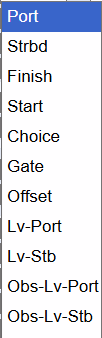
- Start or Finish: Pass through the line at the mark location
- Strbd or Port: Round the mark, leaving it on the required side
- Gate: It's a gate. Go through it.
- Offset: Round in the same direction as the prior mark
- Choice: Handling the mark may be defined by SI's or may be a choice of the racer.
- Lv-Port or -Strbd: Pass the mark, leaving it on the required side.
- Obs-Lv-Port or -Stb Leave an obstruction on the required side. Will not be listed in the course but use to keep courses off land.
Commit
Press "Submit" to save the course. If things get confusing, refresh the page to see where you are standing.
Inserting and Removing Marks
To delete a mark from a course, use the dropdown menu for that position and set it to -none-. When you submit and refresh, the mark will be gone.
To insert a mark, click the ➕plus icon where you want to insert the mark. Then set it as above.